
You're in Here's your cheat-sheet. Print it or screenshot it for the boat. The monthly SITREP comes to your inbox.
Free · SEQ sounder cheat-sheet
The four dials that matter
Whatever brand is on your dash, four settings do ninety percent of the work. Master these and you'll out-fish someone running a more expensive sounder on auto.
1 · Range: take it off auto first
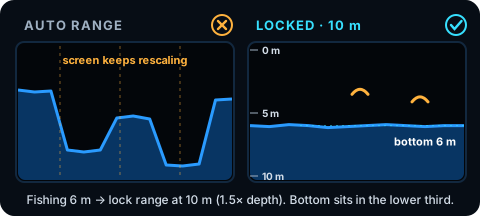
Lock it at 1.5× your working depth.
Fishing six metres, lock it to ten. Fishing twenty, lock it to thirty. The bottom sits in the lower third and the screen stops breathing. If you do nothing else, take your range off auto.
2 · Gain: find the noise edge
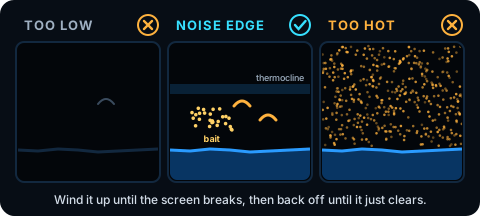
Crank it until the screen breaks, then back it off until it just clears.
Idle over clean bottom. Wind the gain up until the screen fills with speckle, then back it off slowly. The instant the speckle clears, stop. That edge is where the bait, the thermocline and the prawns live. Redo it every session.
3 · Frequency: wide to find, narrow to confirm
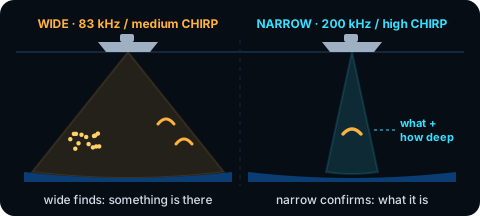
Under ~10 m: high, 200 kHz or high CHIRP. 10–40 m: start wide, 83 kHz or medium CHIRP.
Mark something worth a second look, punch back up to high and idle back over it. Wide tells you something is there. Narrow tells you what it is and how deep it's sitting.
4 · Scroll: match the boat
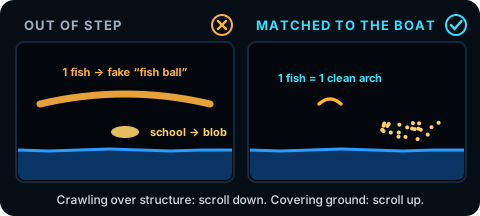
Crawling and reading structure: wind it right down. Covering ground: wind it up.
Out of step, one fish stretches into a fake "fish ball" or a real school squashes into a blob. Scroll matched plus a locked range gives an honest screen.
Bonus · Colour bright, contrast back
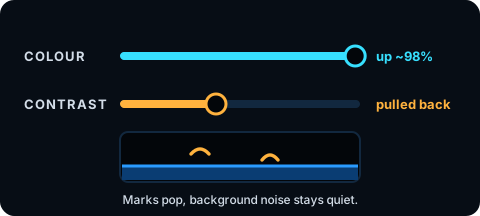
Colour up around 98%, then pull the noise back with contrast.
The dial that isn't on the unit: speed
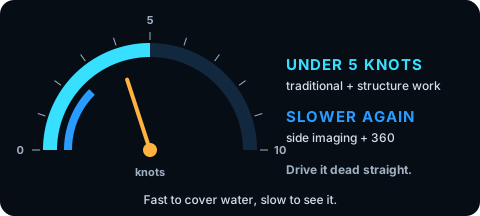
Under 5 knots for traditional and structure work. Slower again for side imaging and 360.
More pings on each patch of bottom = more detail. Drive it dead straight. Fast to cover water, slow to see it.
The five-minute drill
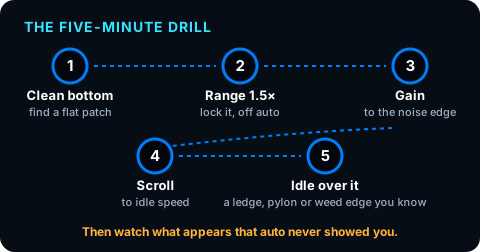
Clean bottom → lock range at 1.5× depth → gain to the noise edge → scroll to idle speed → idle over a ledge, pylon or weed edge you know. Watch what appears that auto never showed you.
From Sonar Clarity Pro by Cody Christensen · Tactical Angler · Fish Smarter, Faster.
Want the rest?
Brand menus, real screens, SEQ profiles
The full Sonar Clarity Pro guide has the menu-by-menu setup for Garmin, Lowrance, Humminbird and Simrad, a read library off my own screens on SEQ water, tuning profiles for Pumicestone Passage, Moreton Bay and the Brisbane River mouth, and four printable quick cards.